
SIMD getting started
SIMD (Single Instruction, Multiple Data), in simple terms, refers to CPU instructions that allow computations to take place in parallel. While standard instructions typically execute one at a time (scalar), SIMD performs multiple calculations simultaneously. For example, you can process 8 data points in a single clock cycle, significantly optimizing both performance and power efficiency.
This post focuses on NEON (ARM's SIMD architecture) rather than Rust's standard SIMD library, simply because I prefer the control of specialization over generalization.
Following the guide
ARM Developers provides a guide for getting started with NEON by taking an existing x86_64 (AVX) example and converting it to NEON using SIMD.info to find the relevant counterparts.
Reference program com arm.com.
#include <xmmintrin.h>
#include <stdio.h>

int main() {
    __m128 a = _mm_set_ps(16.0f, 9.0f, 4.0f, 1.0f);
    __m128 b = _mm_set_ps(4.0f, 3.0f, 2.0f, 1.0f);

    __m128 cmp_result = _mm_cmpgt_ps(a, b);

    float a_arr[4], b_arr[4], cmp_arr[4];
    _mm_storeu_ps(a_arr, a);
    _mm_storeu_ps(b_arr, b);
    _mm_storeu_ps(cmp_arr, cmp_result);

    for (int i = 0; i < 4; i++) {
        if (cmp_arr[i] != 0.0f) {
            printf("Element %d: %.2f is larger than %.2f\n", i, a_arr[i], b_arr[i]);
        } else {
            printf("Element %d: %.2f is not larger than %.2f\n", i, a_arr[i], b_arr[i]);
        }
    }

    __m128 add_result = _mm_add_ps(a, b);
    __m128 mul_result = _mm_mul_ps(add_result, b);
    __m128 sqrt_result = _mm_sqrt_ps(mul_result);

    float res[4];

    _mm_storeu_ps(res, add_result);
    printf("Addition Result: %f %f %f %f\n", res[0], res[1], res[2], res[3]);

    _mm_storeu_ps(res, mul_result);
    printf("Multiplication Result: %f %f %f %f\n", res[0], res[1], res[2], res[3]);

    _mm_storeu_ps(res, sqrt_result);
    printf("Square Root Result: %f %f %f %f\n", res[0], res[1], res[2], res[3]);

    return 0;
}
Here is my version of a counterpart in rust:
use std::arch::aarch64::{
    vaddq_f32,
    vcgtq_f32,
    vld1q_f32,
    vmulq_f32,
    vsqrtq_f32,
    float32x4_t,
    vgetq_lane_f32,
};

fn main() {
    unsafe {
        let a_vec = [16.0f32, 9.0, 4.0, 1.0];
        let b_vec = [4.0f32, 3.0, 2.0, 2.0];
        let a: float32x4_t = vld1q_f32(a_vec.as_ptr());
        let b: float32x4_t = vld1q_f32(b_vec.as_ptr());

        let cmp = vcgtq_f32(a, b);
        let lanes: [u32; 4] = std::mem::transmute(cmp);

        for i in 0..4 {
            if lanes[i] != 0 {
                println!("{} is greater than {}", a_vec[i], b_vec[i]);
            } else {
                println!("{} is not greater than {}", a_vec[i], b_vec[i]);
            }
        }

        let add_result = vaddq_f32(a, b);
        let mul_result = vmulq_f32(add_result, b);
        let sqrt_result = vsqrtq_f32(mul_result);
        println!(
            "Addition results: {} {} {} {}",
            vgetq_lane_f32(add_result, 0),
            vgetq_lane_f32(add_result, 1),
            vgetq_lane_f32(add_result, 2),
            vgetq_lane_f32(add_result, 3)
        );

        println!(
            "Multiplication results: {} {} {} {}",
            vgetq_lane_f32(mul_result, 0),
            vgetq_lane_f32(mul_result, 1),
            vgetq_lane_f32(mul_result, 2),
            vgetq_lane_f32(mul_result, 3)
        );

        println!(
            "Square Root results: {} {} {} {}",
            vgetq_lane_f32(sqrt_result, 0),
            vgetq_lane_f32(sqrt_result, 1),
            vgetq_lane_f32(sqrt_result, 2),
            vgetq_lane_f32(sqrt_result, 3)
        );
    }
}
Breaking it down
We are primarily looking at vector instructions across \(N\) lanes.
Each lane holds a specific number of bits; the bit-width of the register determines how many lanes you can use. For example, a 128-bit register can be split into four 32-bit lanes.
float32x4_t: A register containing four 32-bit lanes, totaling 128 bits of memory.
vld1q_f32: Loads an array into a 128-bit float32x4_t register.
vaddq_f32: Takes two float32x4_t vectors and adds their corresponding elements (e.g., index 0 of the first vector is added to index 0 of the second).
vcgtq_f32: Compares elements of two vectors to determine if the first is "Greater Than" the second. It returns 0 for false and the 32-bit maximum (all bits set to 1) for true.
vmulq_f32: Multiplies the corresponding elements of two vectors.
vsqrtq_f32: Calculates the square root of each individual element in the vector.
vgetq_lane_f32: Extracts the value from a specific lane within a 4-lane vector.
The remaining code uses standard Rust patterns which we won't cover in detail here.
Compilation Create a file named arm_example.rs and compile it using the optimization flag:
After compiling, you can run the program to see the parallel results:
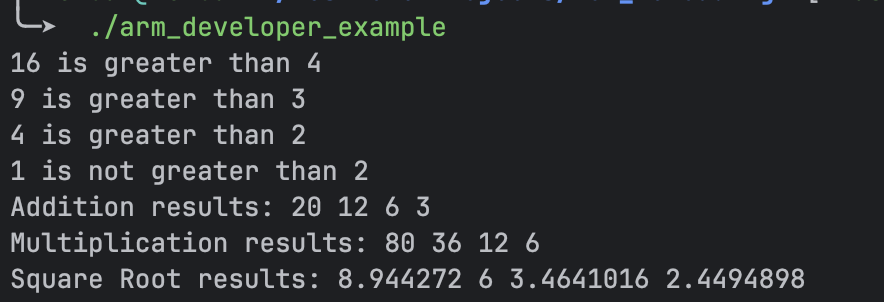
Arm example program output