
Hot reloading
Hot reloading is an effective way to keep development iterations fast. Furthermore, it could—and probably already does—help solve some production issues. Here, we will take a naive and simplified look at how it could be used for a live trader to reload a critical component without restarting the entire suite, but instead only a specific component.
The layout of our small example will be simple. We will have a main CLI binary and a shared dynamic library that we hot reload. More specifically, we create a CLI that prints the price of an asset on Binance every five seconds. We can then utilize the hot-reload functionality to introduce an order book for the spread or a second API interface at runtime, provided we keep our logic tight.
While our example is simple, imagine having a live trader with a preflight time of one minute or more. It might need to download a number of candles to initialize indicators, or even more data to normalize values for machine learning. It could also be used for high-frequency trading, where even a minute of downtime is critical for current positions and, even worse, costs money.
Limitations
We have a few limitations or at least obstacles that we need to address to achieve hot reloadability successfully.
- Rust has no stable ABI
- We have to introduce a stable ABI
- Components need to be decoupled from the start by this design
ABI
Rust does not have a stable Application Binary Interface (ABI). This is a design choice in rustc to allow optimization of memory layout along with other performance improvements. However, this represents a significant challenge. If we were to rely on Rust’s unstable ABI, which makes no guarantees about types such as String or Vec, even the slightest change could cause a crash.
Because of this, we need to bridge into something that does have a stable ABI. This is where the Foreign Function Interface (FFI) comes into play. FFI is simply the ability to call a procedure or routine from a different language. In this example, we will use the stable ABI provided by C.
Price printer
[package]
name = "price_printer"
authors.workspace = true
edition.workspace = true

[dependencies]
reqwest = { version = "0.13.1", features = ["json"] }
tokio = { version = "1", features = ["full"] }
serde = { version = "1", features = ["derive"] }

[lib]
crate-type = ["rlib", "dylib"]
use std::time::Duration;
use serde::Deserialize;
use reqwest::Error;
use tokio::time::sleep;

#[derive(Deserialize, Debug, Clone)]
pub struct TickerPrice {
    pub symbol: String,
    pub price: String,
}

#[unsafe(no_mangle)]
pub extern "C" fn price_printer(keep_running: *const std::sync::atomic::AtomicBool) {
    let rt = tokio::runtime::Builder::new_current_thread()
        .enable_all()
        .build()
        .unwrap();

    let symbol = "SOLUSDC";
    let url = format!("https://api.binance.com/api/v3/ticker/price?symbol={}", symbol);
    let client = reqwest::Client::new();

    rt.block_on(async {
        loop {
            if unsafe { (*keep_running).load(std::sync::atomic::Ordering::Relaxed) } {
                break;
            }

            sleep(Duration::from_secs(1)).await;
            let response = client.get(&url).send().await.unwrap();
            let price: TickerPrice = response.json().await.unwrap();
            print!("{}: {}\r\n", price.symbol, price.price);
        }
    });
}

pub async fn fetch_price(client: &reqwest::Client, url: &str) -> Result<TickerPrice, Error> {
    let response = client.get(url).send().await?;
    let ticker: TickerPrice = response.json().await?;
    Ok(ticker)
}
Main loop
[package]
name = "main"
version = "0.1.0"
edition = "2024"

[dependencies]
tokio = { version = "1", features = ["full"] }
crossterm = "0.29.0"
libloading = "0.9.0"
anyhow = "1.0.100"
use crossterm::{
    event::{self, Event, KeyCode, KeyEvent, KeyModifiers},
    terminal,
};
use std::io;
use std::sync::Arc;
use std::sync::atomic::{AtomicBool, Ordering};
use libloading::Library;

type PriceYielder = unsafe extern "C" fn(*const AtomicBool);

async fn trader() -> anyhow::Result<()> {
    let lib_path = format!("target/debug/libprice_printer.dylib");

    loop {
        let lib = unsafe { Library::new(&lib_path)? };
        let price_yielder: libloading::Symbol<PriceYielder> = unsafe { lib.get(b"price_yielder")? };

        let stop_signal = Arc::new(AtomicBool::new(false));
        let stop_signal_clone = Arc::clone(&stop_signal);
        let func: PriceYielder = *price_yielder;
        let spawn = tokio::task::spawn_blocking(move || {
            let ptr = Arc::as_ptr(&stop_signal_clone);
            unsafe {
                func(ptr);
            }
        });

        let input = wait_for_input()?;
        stop_signal.store(true, Ordering::Relaxed);
        spawn.await?;

        if input {
            continue
        } else {
            break;
        }

    }
    Ok(())
}


#[tokio::main]
async fn main() {
    trader().await.unwrap();
}

fn wait_for_input() -> io::Result<bool> {
    terminal::enable_raw_mode()?;

    loop {
        if let Event::Key(KeyEvent { code, modifiers, .. }) = event::read()? {
            if code == KeyCode::Char('r') && modifiers.contains(KeyModifiers::CONTROL) {
                terminal::disable_raw_mode()?;
                return Ok(true);
            }

            if code == KeyCode::Char('c') && modifiers.contains(KeyModifiers::CONTROL)  {
                terminal::disable_raw_mode()?;
                return Ok(false);
            }
        }
    }
}
Demonstration
For the demononstration, I simply started the program, went back and changed the price printer to print BTCUSDC instead of SOLUSDC, did a cargo build followed by ctrl + r in the terminal.
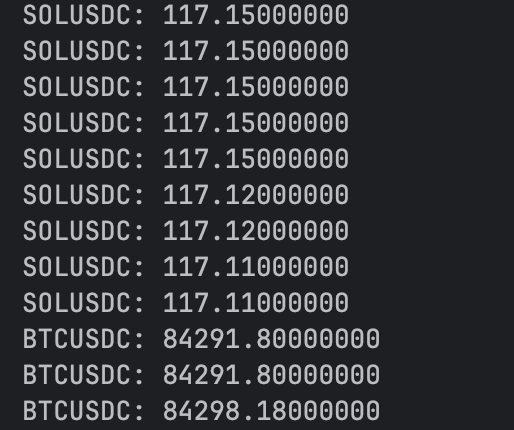
Hot reload from SOLUSDC to BTCUSDC
Conclusion
While this was a soft and simple introduction, the application and usecases for hot reloading is numerous, we barely touched the subject here, inter communication is also possible with say a C struct, that could help preserve states between hot reloads.